
Mimamori
見守りmee-mah-MOH-ree
A lightweight native mac app that keeps watch over git worktrees while coding agents work.
It sits beside Claude Code, Codex, Cursor or whatever you run, and answers two questions at a glance: what is it doing right now, and should I be worried?
$ brew install --cask cocoabeans/tap/mimamori
Free and open source · macOS 15 or later · Apple silicon and Intel · Signed and notarized
Three agents start work in a web shop's worktrees. Each edit shows up within moments, and the toolbar says who needs you.
Watching over, with care
Mimamori is Japanese for watching over someone with care: the way you watch children at play, ready to step in.
That is the job when an agent edits on your behalf. You don't need a git client built for committing. You need something that refreshes by itself, shows what changed in the last minute, keeps the whole session in view after the agent commits, and points out the few changes that deserve a human look.
What it does
Add a repository and Mimamori finds its worktrees, including the ones agent tools create, and watches them all.
Watches live
Changes appear a few hundred milliseconds after files settle. Recently touched files glow and say “12s ago”, so you can see where the agent is working.
Knows where the agents are
It shows which worktree each agent is in and, with hooks connected, each tool call, when a turn ends, and when one needs your permission.
Flags what deserves a look
Secrets and .env files, lockfiles, CI and agent instruction files, skipped or deleted tests, mass deletions, conflict markers, and edits outside your scope.
Compares against the right baseline
Agents commit as they go. See what's uncommitted, everything since the branch point, since you pressed Mark Start, or since any earlier snapshot.
Remembers what you've reviewed
Mark files reviewed as you read them. When an agent edits one again, it comes back as changed since your review, with just the new edits.
Writes up a session
A Markdown summary of what changed, what needs attention, the commits and what the agent did, ready for a pull request or a handoff note.
Every agent, at a glance
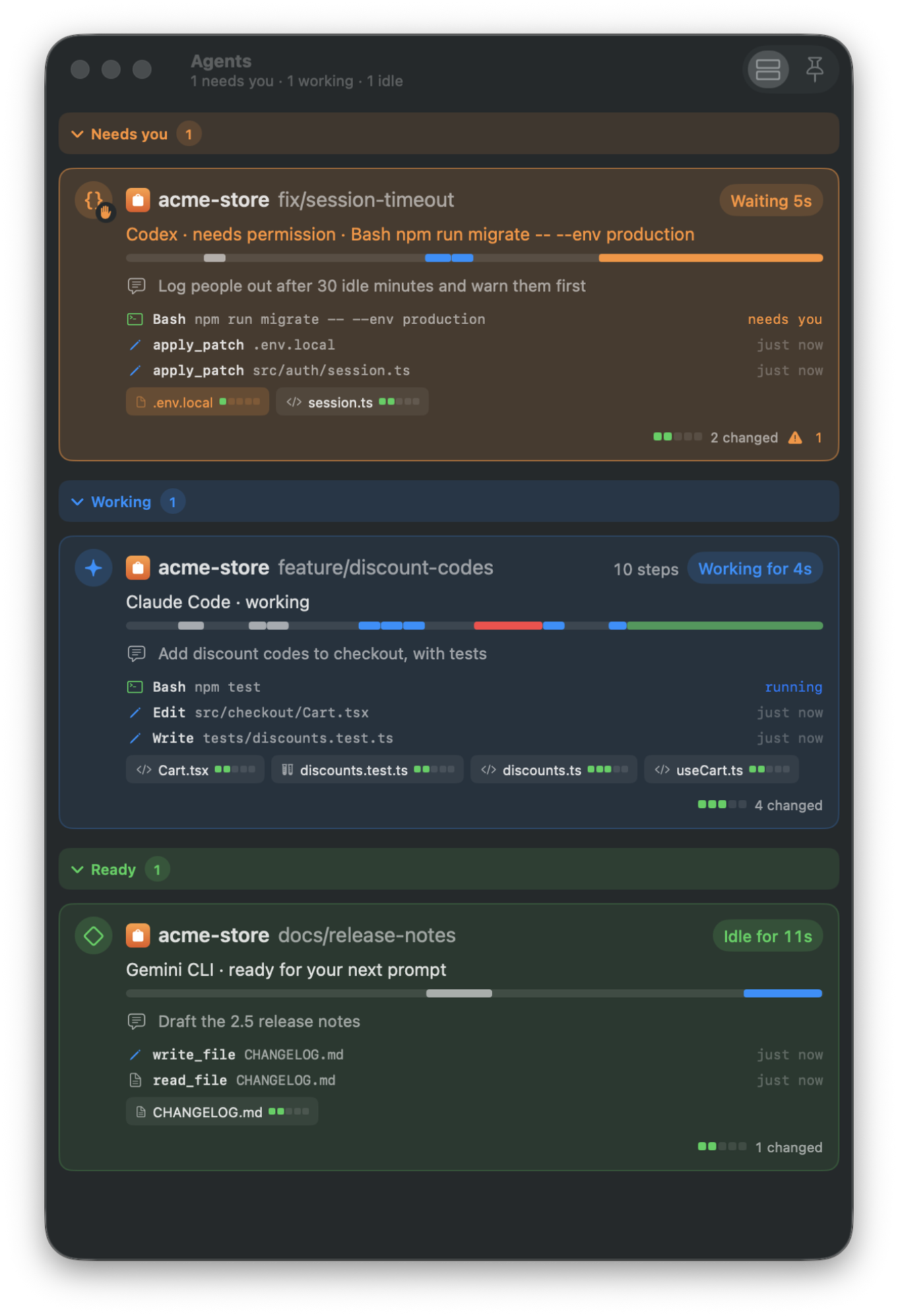
The Agents window lists each worktree with an agent in it, grouped by who needs you, who's working and who's ready. Each card shows the agent's task, its latest steps, the files it touched, and a strip of its tool calls over time. The menu bar and a desktop widget keep the same picture in view.
- Claude Code
- Codex
- Gemini CLI
- Cursor
- Aider
- Hermes
- Goose
- OpenCode
- Amp
Or any agent that can run a command from a hook.
Read-only, and private
Mimamori can watch any repository while another tool is busy in it, because it never gets in the way.
- Never touches your work. It never stages, commits, checks out or takes the repository's
index.lock. Your code, branches and index stay as they are. - Talks to nothing but your local git. No account and no telemetry. Agents reach it through a socket only your own processes can use.
- One exception: updates. Release builds ask GitHub for the list of releases when you check for updates, or once a day if you agree. Nothing about you or your Mac goes with it.
- Open source. MIT licensed, so you can read every line or build it yourself.
Install
Mimamori needs macOS 15 or later and a git binary. It runs natively on Apple silicon and Intel and keeps itself up to date.
Homebrew
brew install --cask cocoabeans/tap/mimamoriDownload
Get the latest release, open the disk image, and drag Mimamori to Applications. It's signed with a Developer ID and notarized by Apple.
The first time it opens, a welcome window explains what it reads and writes before anything is installed.